How to Make a Raindance Video With Two Photos (Step by Step)
A complete walkthrough: pick two portraits, choose 8-second or 28-second, generate the duet, and post it. Includes photo tips, pricing, timing, and privacy details.
 Raindance Generator Editorial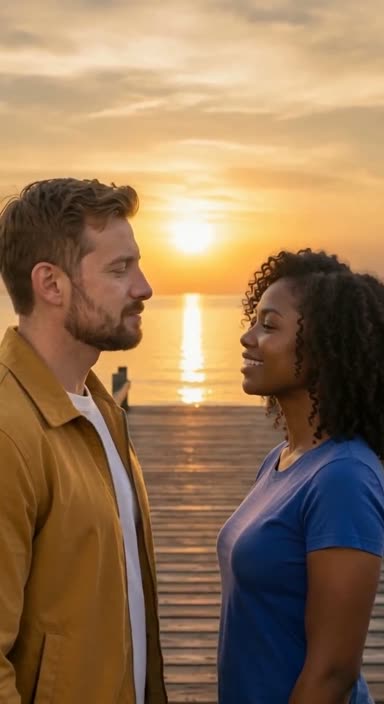
The Raindance video — two people on a sunset pier, set to Dave and Tems' "Raindance" — used to require filming at a beach with good light. Now you can make one from two portrait photos in about a minute. Here is the entire process, step by step, with the details most tutorials skip.
What you need before starting
- Two separate portrait photos. One per person. Not a single photo of both people — the tool maps each photo onto a different performer in the scene.
- A clear, adult, front-facing face in each photo. Hats, sunglasses, heavy filters, and extreme side angles all reduce face fidelity.
- No other people in the frame. Group photos confuse the face mapping.
- Both people's consent. Every person pictured must be an adult who agreed to appear.
Step 1: Choose your length
Most tools, including ours, offer two lengths:
- 8-second classic duet. The core golden-hour pier moment. This is the version most people saw first on TikTok.
- 28-second full story. The complete trend cut: the pier opening, the singer's entrance, and the sunset duet, with the full music section.
At Raindance Generator, the 8-second version costs 1 credit and the 28-second version costs 3 credits. Credits are $6.99 for one or $17.99 for three, one-time — so a 28-second video is $17.99 if bought as the three-pack, and an 8-second video is $6.99.
Step 2: Upload the two portraits
The first photo becomes the singer — the person who performs the bridge toward the camera. The second becomes the partner who waits on the pier. You can swap the two roles with one click before generating.
Photo tips that measurably improve results:
- Even, front lighting on the face. Backlit photos lose facial detail.
- Neutral or slight smile. Wide open mouths produce odd first frames.
- Shoulders visible, not extreme close-ups. The tool maps the head and neck.
- Recent photos. Beards, hair changes, and glasses since the photo was taken will not appear in the video.
Step 3: Generate and wait
Press generate. The upload happens at this point — not before — and processing a video typically takes a few minutes. You do not need to keep the tab open; your video appears in your account when it is ready.
If generation fails, paid credits are refunded automatically. You are never charged for a failed video.
Step 4: Check the result and download
Your video arrives as a vertical 720p MP4 with the music included — the exact format TikTok, Reels, and Shorts expect. No editing, watermarking, or audio syncing needed. Download it and post.
Check two things before posting:
- Face fidelity. Does each performer look like the person in the photo? If not, regenerate with a clearer photo — this is almost always a photo problem, not a tool problem.
- The role assignment. Confirm the right person is the singer before sharing.
What happens to your photos
This is the question people should ask more often. At Raindance Generator:
- Photos are deleted within 24 hours of upload.
- Photos are never used to train AI models.
- Uploaded photos are stored privately, and you can remove one with its remove button at any time before generating.
- Generation and safety providers process your photos only to make the video.
Frequently asked questions
Can I use one photo with two people in it? No — two separate portraits give much better face fidelity, one face per photo.
Can I do this with a friend far away? Yes. Each of you just needs to send one portrait photo. Nothing is filmed together.
Is it really my face in the video? The tool maps your photo's face onto a performer in a pre-made scene. Fidelity is high with a good photo, but it is a generated likeness, not filmed footage — treat it as a stylized portrait of you both.
What does it cost? $6.99 for one credit (one 8-second video) or $17.99 for three credits (e.g. one 28-second video, or three takes of the 8-second version). One-time payment, no subscription.
Ready to try it? Make your Raindance video — it takes about a minute.